Applies to: All Employees, Team Leaders/Managers and HR/Customer Administrators
Although you can close your internet browser window or tab, this does not necessarily log your session out.
If you have MyPeople open on an internet tab alongside other tabs in your internet browser, closing the tab can still keep your session open. Internet browsers use session cookies, which are a built-in function on most internet browsers to temporarily cache your information. This is useful, because whilst you have that session open, you don’t need to enter the same credentials again.
For security reasons, we recommend you sign out using the steps below or completely exit your internet browser, whenever you are not using MyPeople.
- To log out of MyPeople, click your name on the portal top bar, then from the user menu click sign out.
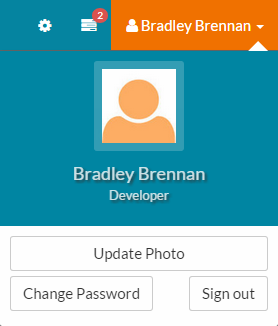
 This closes your session on MyPeople, even if you keep your internet browser or tab open.
 - This is the recommended way to log out of MyPeople.
- After signing out, you will be returned to the MyPeople log in page.
Was this article helpful?
That’s Great!
Thank you for your feedback
Sorry! We couldn't be helpful
Thank you for your feedback
Feedback sent
We appreciate your effort and will try to fix the article